
Use the Path sorting feature to organize loans in the pipeline by one or more columns, making it easier to review and prioritize loan files.
Note: This will sort individual pipelines not all users.
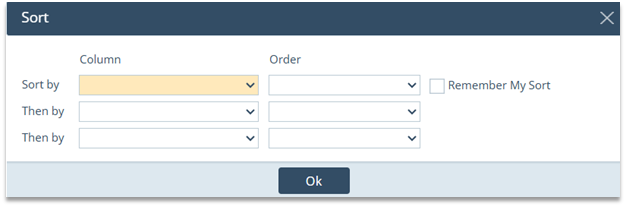
|
Option |
Description |
|
Sort by |
Selects the primary column Path uses to organize the loans, such as Borrower Name, Loan Number, Loan Amount, or another available pipeline column. |
|
Order |
Controls the direction of the sort. Ascending arranges A–Z, oldest to newest, or lowest to highest. Descending arranges Z–A, newest to oldest, or highest to lowest. |
|
Then by |
Applies a secondary sort when multiple loans have the same value in the Sort by column. |
|
Second Then by |
Provides a third sorting level when records still share the same values after the first two selections. |
|
Remember My Sort |
Saves the selected arrangement to the user profile so Path can reuse it when the user returns to the pipeline, including after signing out and back in. |
|
OK |
Applies the selected sorting options. |
- From the pipeline, open the hamburger menu and select Pipeline Sorting.
- Under Sort by, select a pipeline column, such as Loan Amount.
- Under Order, select Ascending or Descending.
- Use either Then by row when an additional sorting level is needed.
- Select Remember My Sort to retain the arrangement for future sessions.
- Click OK to apply the sorting options.
Example: Select Loan Officer as the primary sort and Borrower Name as the secondary sort. Path groups the loans by Loan Officer, then arranges each Loan Officer’s loans alphabetically by borrower name.
Key Point: The first row is always the primary sort. The Then by rows do not replace it; they only organize records that have matching values in the previous sorting level.
