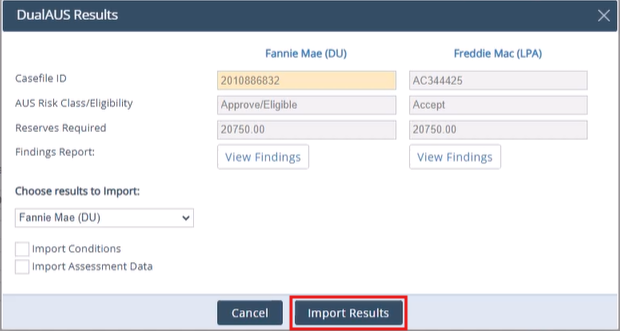

Path Dual AUS allows users to access both Fannie Mae and Freddie Mac findings in one step.
Prerequisites
1. Confirm Desktop Originator/Underwriter credentials are entered.
2. Confirm Loan Product Advisor (LPA) credentials are entered.
Running Dual AUS
1. Open a file.
2. Navigate to Production> Interfaces > AUS.
3. Select Dual AUS.

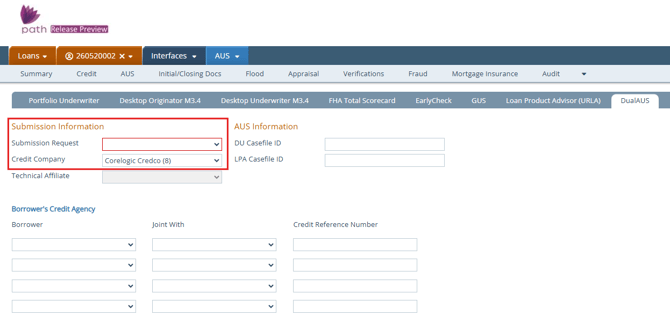
4. Select Submission Request type. Choose Credit & Underwriting for first time running.
5. Select a Credit Company that was used in the file credit report.
6. Select borrower name from dropdown. If credit report is joint with co-borrower, select co-borrower name under Joint With dropdown.
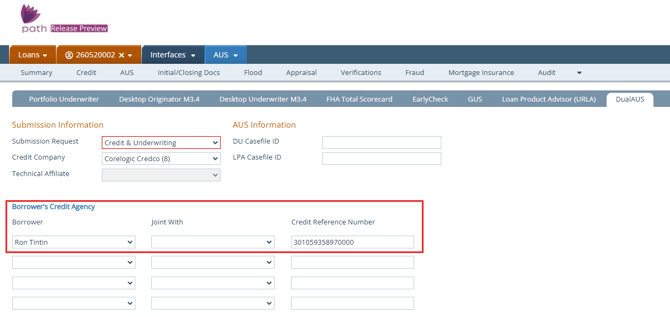
7. Click Order button.
8. A Dual AUS Results screen will show the findings for both Fannie Mae and Freddie Mac. Click View Findings button to view the loans findings.
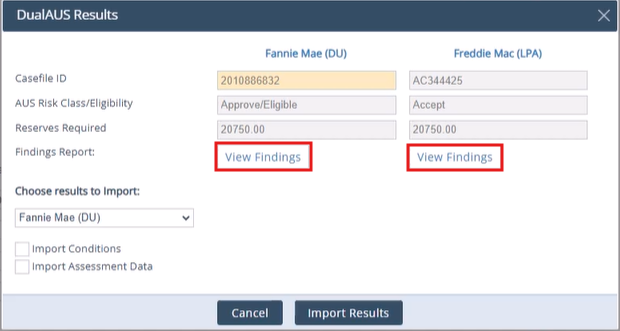
9. Choose either Fannie Mae or Freddie Mac from the dropdown to import the results into your file. You can also check the boxes to import conditions or assessment data as well.
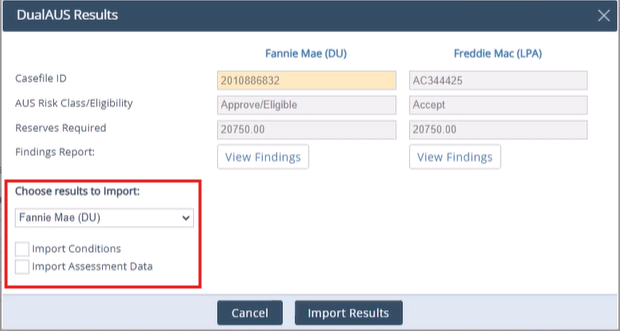
10. Click Import Results button.