
- Open a loan file.
- Navigate to Interfaces → Appraisal
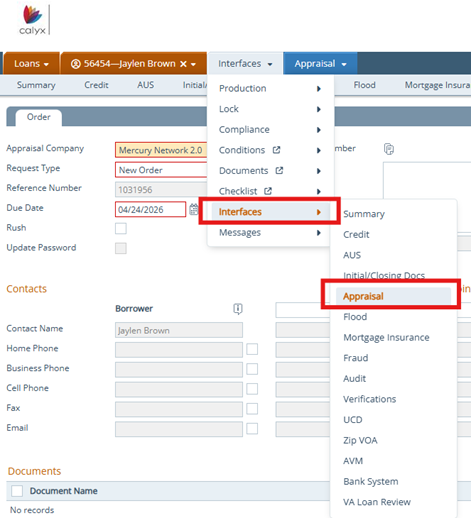
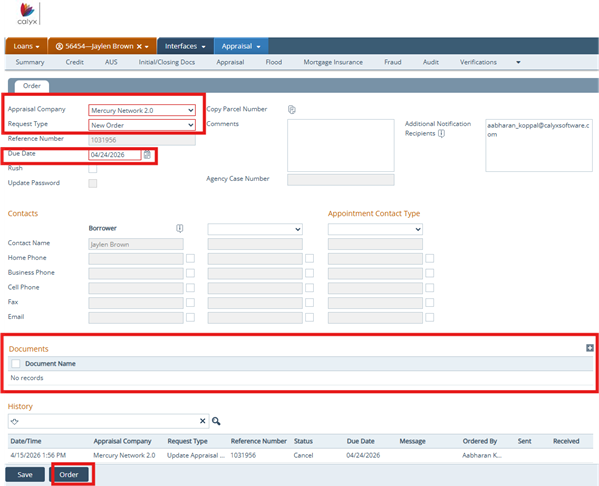
- Choose Mercury Network 2.0 for the Appraisal Company.
-
Select an Appraisal Request Type
-
-
Set Request Type.
-
Select the Due Date.
-
For updated orders enter the Reference Number.
-
Upload required documents, if applicable.
- Select Order.
-
5. Enter your account number, username, password.
6. Click OK.
7. Enter your information when the Information screen opens. Select Client ID, Order Type, Valuation Assignment Type, Payment Type.
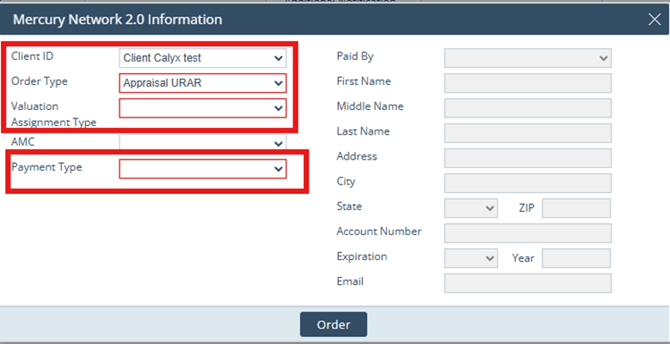
Required Fields:
-
-
Loan Type - ie Conventional
-
Property Usage Type - ie Primary Residence
-
Number of Units in Subject Property
-
Property Valuation Method Type - ie Active Appraisal checked and Appraisal Method
-
