
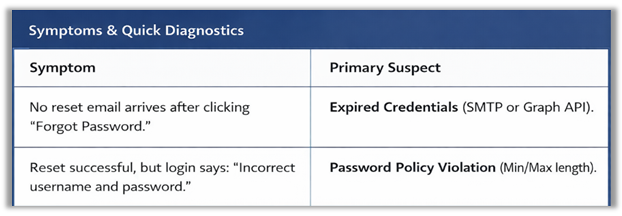
This article covers the most common Path password reset problems and how to fix them quickly—especially when the reset email never arrives, or the user can’t login after successfully resetting their password.
Applies To
- Path end users resetting their password
- Path Admins / Customer IT supporting email delivery and security policies
Root Causes
- Path Business Units: Path email delivery depends on BU configuration and the customer’s selected email method.
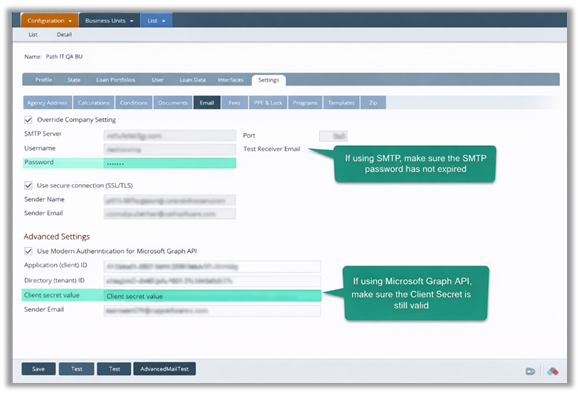
- SMTP: Reset emails fail when the SMTP password expires, which can stop all Path outbound emails.
- Microsoft Graph API: Reset emails fail when the Graph API client secret/security key expires, which can also stop all Path outbound emails.
Resolution
Scenario A: Password Reset Email Not Received ➜ Identify which method the customer is using:
- SMTP, or
- Microsoft Graph API (Advanced Settings)
- Check for Expired Credentials ➜ Confirm the customer’s email credentials are still valid:
- SMTP: Customer IT verifies the SMTP password is valid
-
- If expired: reset/update the SMTP password and update it anywhere Path uses it
- Microsoft Graph API: Customer IT verifies the Client Secret is valid
-
- If expired: generate a new Client Secret in Azure and update it in Path’s email configuration
- Retest the Password Reset
- Confirm the fix worked:
- Have the user click Forgot Password again
- Confirm the reset email has been successfully delivered
Scenario B: “Incorrect Username and Password” After Reset
- Confirm the Username ➜ Make sure they’re signing into the right account:
- Verify the user is entering the correct username (no typos, correct account)
- Verify Password Policy Requirements ➜ Confirm the password length rules:
- Minimum character length
- Maximum character length
- Reset Again Using a Compliant Password
- Example failure: 9 characters when the minimum is 10
- Example failure: 15–16 characters when the maximum is 14
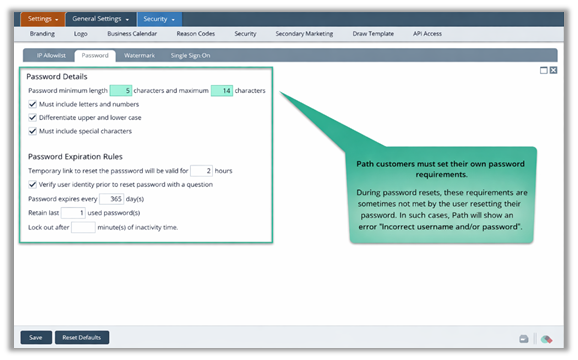
Note: Path may still display “Incorrect username and password” even if the reset process completed, when the real issue is that the password does not meet policy requirements.
Summary
This KB helps you quickly restore Path access when a password reset fails—either the reset email never arrives, or the login fails after a “successful” reset. By focusing on the real culprits (expired SMTP/Graph credentials and password length rules), you can cut downtime, reduce repeat tickets, and get Path email delivery back to normal.
