![Point.png]](https://www.calyxsoftware.com/hs-fs/hubfs/Point.png?height=40&name=Point.png)
SSL:
SSL (Secure Sockets Layer) is the standard security technology used to establish an encrypted link between a web server and a browser. This link ensures that all data passed between the web server and browsers remain private and integral.
In PointCentral®, an encrypted link is established between the Point® client and the PointCentral Web Service that runs on the server where PointCentral is installed.
Encryption Protocols:
PointCentral does not dictate the security protocols used on the client and server devices.
PointCentral requires the use of an SSL Certificate. This certificate is used to validate that the connections from the client that runs Point are reaching the expected PointCentral server.
The authentication and encryption protocols used are negotiated by the client and server based on what is available.
If you disable the unwanted protocols on both ends, Point should continue to connect and communicate with the PointCentral server without any issues as long as the two systems have at least one mutually agreeable protocol (SSL 3.0, 3.1,TLS 1.2, etc.).
Supported Protocols:
IIS web server uses a minimum of TLS 1.2.
SSL Certificate Lifecycle Changes:
The SSL certificate industry is reducing certificate validity periods. PointCentral will not be making changes to accommodate this SSL certificate change.
Customers should contact their Certificate Authority regarding the available options for their certificates.
Certificate Validity Reduction Timeline:
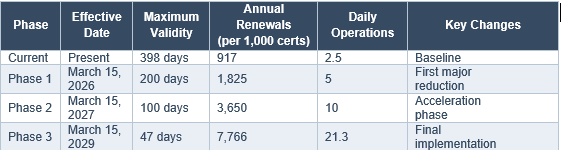
Source: CA/Browser Forum Ballot SC-081v3
The final certificate expiration phase is March 15, 2029, with a maximum validity of 47 days (referenced as 47 days out at time of writing).
Customer Action Items:
- Consult your Certificate Authority regarding available certificate management options.
- The industry is moving toward ACME (Automatic Certificate Management Environment) tools for automated certificate issuance, validation, installation, and renewal.
- Some antivirus and firewall solutions do not support ACME. Confirm compatibility before implementing ACME-based automation.
- Monitor TLS certificate expiration using a utility or an end-to-end availability probing tool.
- Most Certificate Authorities, such as GoDaddy, offer free automation enablement through their dashboard login.
