![Zenly Primary Horizontal Color.png]](https://www.calyxsoftware.com/hs-fs/hubfs/Calyx%20Logos%20and%20Headers/Zenly%20Primary%20Horizontal%20Color.png?height=40&name=Zenly%20Primary%20Horizontal%20Color.png)
The Credit Information screen centralizes borrower and co-borrower credit details, helping users review credit score information, alternate creditor names, and disclosure-related score settings from one screen.
ACCESS THE CREDIT INFORMATION SCREEN
1. Select Processing from the loan navigation.
2. Select Credit Information from the left navigation menu.
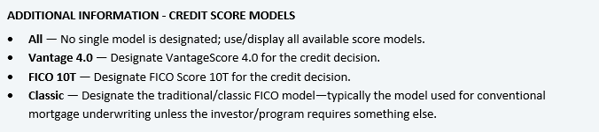
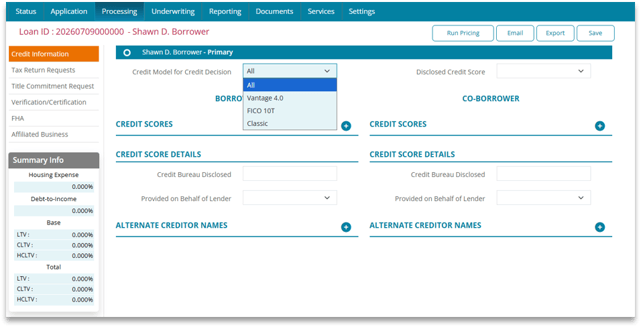
CREDIT MODEL FOR CREDIT DECISION
1. Open the Credit Model for Credit Decision dropdown.
2. Select one of the options shown:
- All
- Vantage 4.0
- FICO 10T
- Classic
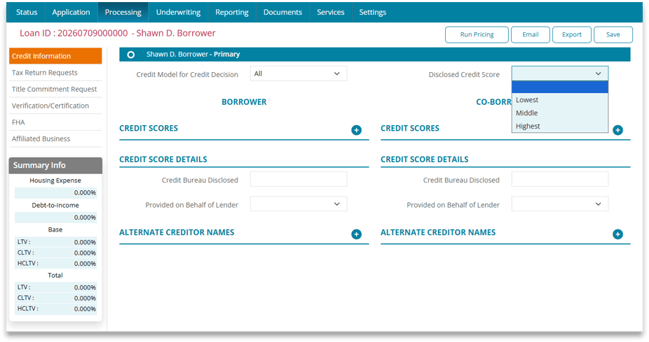
DISCLOSED CREDIT SCORE
Open the Disclosed Credit Score dropdown.

CREDIT SCORES
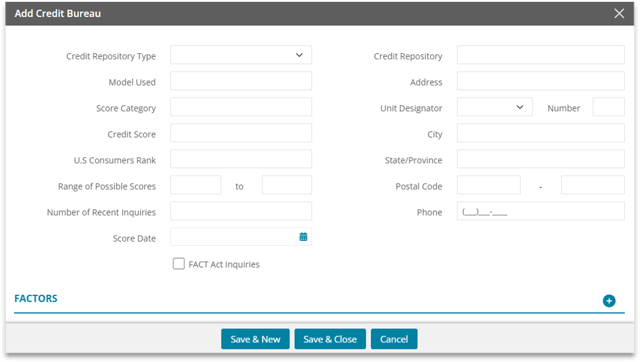
Use the Credit Scores section to add borrower or co-borrower credit bureau information used on the Credit Information screen.
1. Click the plus (+) icon in the applicable Borrower or Co-Borrower Credit Scores section.

2. Select the Credit Repository Type from the dropdown.
3. Complete the credit score information, including Model Used, Score Category, U.S. Consumers Rank, Range of Possible Scores, Number of Recent Inquiries, and Score Date.
4. Select FACT Act Inquiries when applicable.
5. Enter the Credit Repository and complete the available address fields.
6. To add credit factors, click the plus (+) icon in the Factors section, then enter the Code and Description.
7. Click Save & Close to save the factor, or Save & New to add another factor.
8. Click Save & Close on the Add Credit Bureau window, or Save & New to add another credit bureau.
9. Enter the Minimum FICO score when applicable.
10. Repeat the process for the co-borrower as needed.
CREDIT SCORE DETAILS
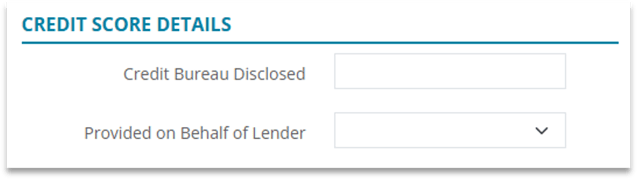
Use Credit Score Details to complete the score disclosure selections for the borrower and co-borrower.
1. For the applicable borrower, select the appropriate Provided on Behalf of Lender option.
2. Select the applicable Disclosed Credit Score option. The current screen shows Lowest, Middle, and Highest as available selections, along with a blank entry.
3. Repeat the selections for the co-borrower as needed.
ALTERNATE CREDITOR NAMES
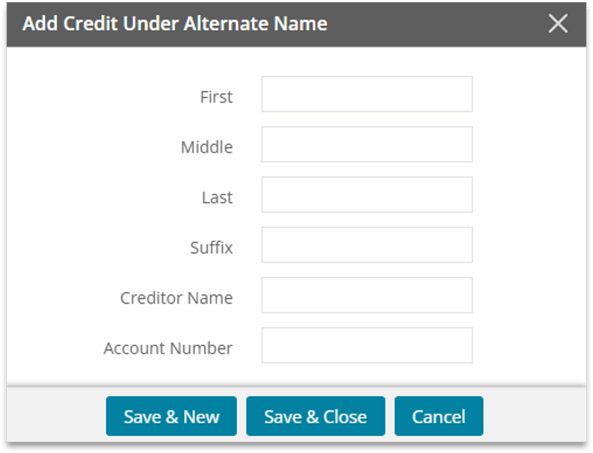
Use Alternate Creditor Names when the borrower or co-borrower obtained credit under a different name.
1. Click the plus (+) icon in the applicable Alternate Creditor Names section.

2. Enter the name previously used by the borrower or co-borrower for credit.
3. Enter the Creditor Name.
4. Enter the Account Number under which the credit was obtained.
5. Click Save & Close to save the entry or Save & New to add another previous name.
6. Repeat the process for the co-borrower as needed.
SUMMARY
The Credit Information screen gives users a single place to maintain credit bureau score information, record alternate names used for credit, and complete borrower and co-borrower credit score disclosure selections.
