![Zenly Primary Horizontal Color.png]](https://www.calyxsoftware.com/hs-fs/hubfs/Calyx%20Logos%20and%20Headers/Zenly%20Primary%20Horizontal%20Color.png?height=40&name=Zenly%20Primary%20Horizontal%20Color.png)
Continuous Marketing Campaigns in Zenly automate borrower emails using field conditions and scheduling, so your team spends less time on manual follow-up and more time moving loans forward. Set them up once, and Zenly manages the timing based on borrower milestones or pipeline activity.
Applies To
- Zenly Users creating or managing Marketing Campaigns
- Administrators supporting Campaign configuration.

Birthday Continuous Campaigns (Date of Birth = Today)
Birthday Continuous Campaigns automatically send personalized birthday emails to borrowers on the exact day their Date of Birth matches today’s date.
For a Birthday Continuous Campaign, the conditions must be configured as follows:
- In the Scheduled Delivery section, select When the Field.
- Set the field to Date of Birth.
- Set the condition to is.
- Select Today.
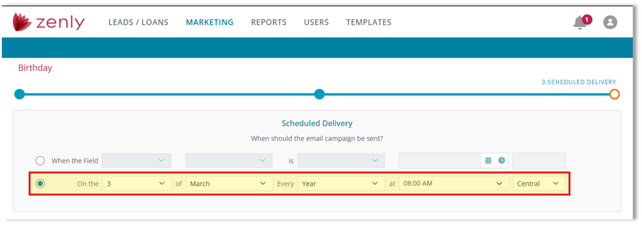
When "Today" is selected:
- The calendar/date picker will appear greyed out.
- This is expected system behavior.
- Zenly automatically checks the pipeline daily.
- The campaign sends to any loan file where the borrower’s Date of Birth matches the current date.
This configuration eliminates the need to manually schedule birthdays while ensuring borrowers receive timely communication.
Important Configuration Note
The calendar/date scheduling option only applies when the dropdown is set to Status.
If "Today" is selected under Date of Birth:
- The calendar will be disabled by design.
- No calendar will be disabled by design.
- The system manages daily evaluation automatically.
Continuous Campaigns Using the "Status" Option
Continuous Campaigns configured with the Status field provide advanced scheduling and condition control.
When using the Status option:
- In the Scheduled Delivery section, select When the Field.
- Set the field to Status.
- Choose the appropriate status value from the dropdown (for example: Application, Processing, Approved, etc.).
- Select the desired condition, such as:
- Equal
- After or Equal
- Is Not Blank
- Not Blank
- Other
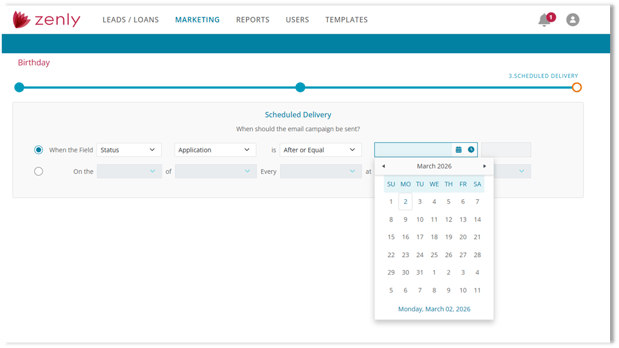
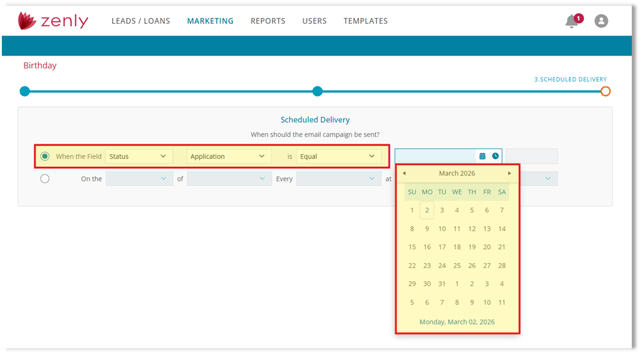
This is where campaign logic is applied. The selected conditions determine which loan files qualify for the marketing campaign based on their current pipeline status. This configuration allows for precise, event-driven marketing automation aligned with operational milestones.
Unlike Birthday campaigns, when using the Status field:
- The calendar/date picker is active and available.
- You may select a specific date using the dropdown calendar.
- You may configure delivery timing by exact day, month, week, or year.
- You may configure delivery timing.
- You may define the exact time the campaign should be sent.
Scheduling by Exact Day, Week, Month, Year, and Time
In addition to condition-based scheduling, Continuous Campaigns also allow you to define a recurring send pattern using the "On the" scheduling option.
When this option is selected:
- Choose the exact day (for example: 1st, 15th, etc.).
- Select the month or choose to repeat every month.
- Define the recurrence frequency (for example: Every Year).
- Set the exact time the campaign should be delivered.
- Select the appropriate time zone.
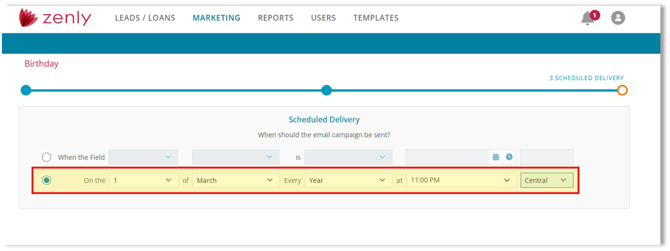
This option is ideal for campaigns such as annual check-ins, seasonal outreach, milestone anniversaries, or other recurring borrower communications. By defining the precise day, month, recurrence pattern, time, and time zone, you ensure consistent and predictable delivery without manual intervention.
Summary
Birthday campaigns run when Date of Birth = Today (the calendar greys out by design because Zenly checks daily). Status-based campaigns use conditions like Equal/After or Equal/Not Blank and allow calendar scheduling. You can also use “On the” to pick an exact day/month/frequency/time/time zone for recurring sends—giving you predictable delivery with minimal effort.
