![Point.png]](https://www.calyxsoftware.com/hs-fs/hubfs/Point.png?height=40&name=Point.png)
If the pipeline view has been enabled and you need to disable it, please complete the following steps:
How to disable Pipeline View
1. Open Point.
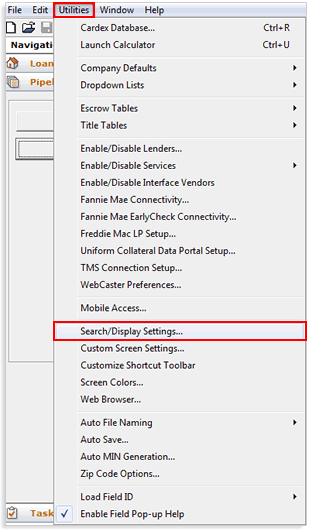
2. From the menu bar, select Utilities > Search/Display Settings.
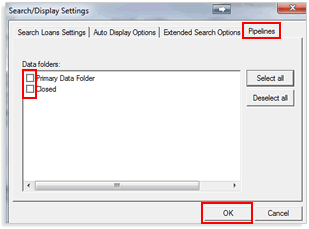
3. From the Search/Display Settings window, click the Pipelines tab.
4. Uncheck the checkbox next to the data folder to which you are disabling pipeline view.
5. Click OK.
6. Point will rebuild the index list which will rebuild the search list.
7. Once Point has finished rebuilding the search list, the pipeline view will be disabled.
