![Point.png]](https://www.calyxsoftware.com/hs-fs/hubfs/Point.png?height=40&name=Point.png)
- Open Point.
- From the Navigation Panel, click Search.
- Double-click any file from the Search Results menu.
- From the Menu bar, select File > Paper Sources.
- Insert a check in the Print Letter as Legal checkbox.
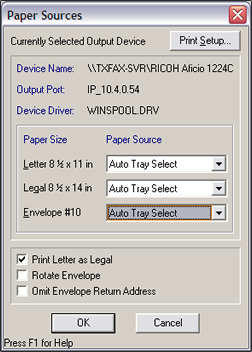
Point does not have an option to print legal documents on letter size paper. Your printer settings may have a Scale to Fit option.
