![Point.png]](https://www.calyxsoftware.com/hs-fs/hubfs/Point.png?height=40&name=Point.png)
SYMPTOM
Logging into PDS after clicking Test Connection, in Point Administrator, generates an error:
"Point could not connect to Point Data Server. The details are:
The underlying connection was closed: Could not establish trust relationship for the SSL/TLS secure channel.
The remote certificate is invalid according to the validation procedure."
CAUSE
The certificate that is installed on the workstation is invalid
RESOLUTION
Install a valid SSL certificate on the workstation
- Go to the Point Data Server administration page.
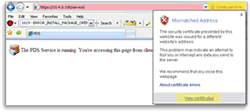
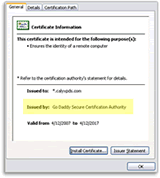
- You should receive a certificate error in the address bar. From the toolbar, click the Certificate field next to the URL and then click View Certificate.
-
If the certificate is issued by GoDaddy, download the updated GoDaddy certificate, gd-class2-root.crt
-
If the certificate is issued by Starfield, download the updated Starfield certificate, sf-class2-root.crt
- If the certificate is issued by your company, click Install Certificate.
- From the Import Certificate wizard, click Next.
- Select Place all certificates in the following store.
- Click Browse and then select Trusted Root Certification Authorities.
- Click Next.
- From the Completing the Certificate Import wizard window, click Finish.
- Once the import is successful, open Point Administrator and login with the Test Connection button for PDS.
-
