![Zenly Primary Horizontal Color.png]](https://www.calyxsoftware.com/hs-fs/hubfs/Calyx%20Logos%20and%20Headers/Zenly%20Primary%20Horizontal%20Color.png?height=40&name=Zenly%20Primary%20Horizontal%20Color.png)
This screen allows the user to create and store custom email templates. Created templates are available to use when starting a new email.
Zenly provides some default email templates. Use the Load Default button to populate the table with pre-typed email samples.
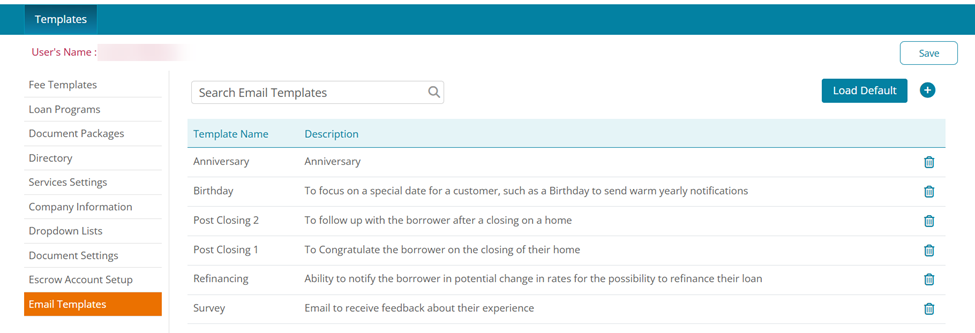
To create an email template:
- Click the Add icon.
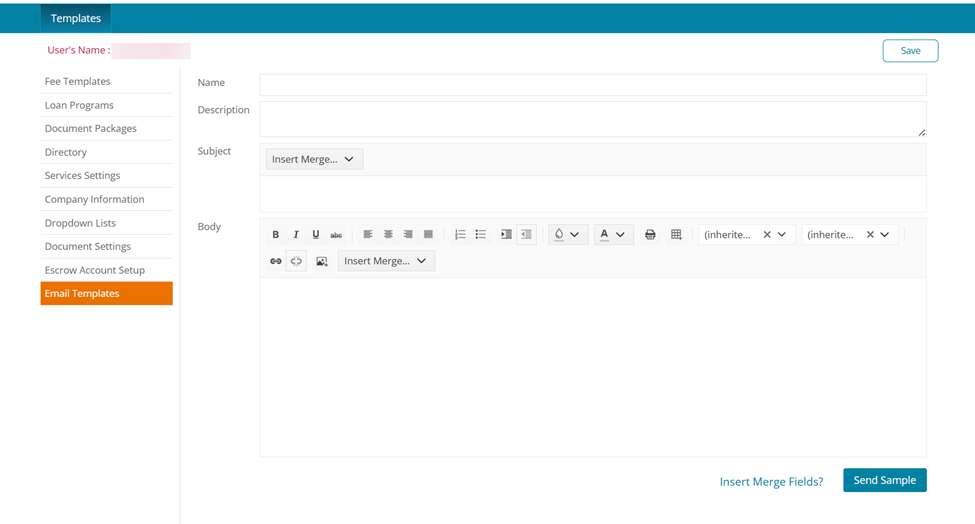
2. Enter the Name of the template.
3. Enter the Description.
4. Enter a Subject.
Use the Insert Merge drop-down menu to add an auto-populated field.
5. Type in the email.
Use the Insert Merge drop-down menu to add an auto-populated field.
6. If needed, send a test email by clicking the Send Sample.
7. Click Save.
